
Guía de Entidades del Mod Verity - Todas las Formas y Cómo Sobrevivir
Todas las entidades del mod Verity explicadas: esfera Verity, The Box, Verity Demon. Comportamientos, mecánicas, sistema Karma y cuenta regresiva de 5 días.
Todo lo que necesitas saber sobre las entidades, comportamientos y mecánicas de Verity en Verity JE para Minecraft Java. Aprende más sobre qué es Verity y consulta nuestra guía de consejos para estrategias de supervivencia.
Verity - La Esfera Compañera de IA

Verity es una esfera amarilla brillante que te sigue en Minecraft. Es tu asistente personal de IA que puede hablar, responder preguntas e interactuar con tu mundo. La esfera flota aproximadamente 2 bloques detrás de ti, manteniendo una distancia cómoda mientras se mantiene lo suficientemente cerca para conversar.
Capacidades principales:
- Responde a tus mensajes de chat con respuestas contextuales generadas por IA
- Comenta sobre tu entorno, señalando características interesantes o peligros
- Lee tus datos del juego (coordenadas, bioma, inventario, salud, nivel de luz, bloque que estás mirando)
- Genera diálogo proactivo cuando estás inactivo, manteniendo la interacción viva
- Soporta todos los idiomas para conversación por texto (funciones de voz probadas solo en inglés)
Lo que Verity sabe: La IA puede leer tu posición, en qué bioma estás, qué hay en tu inventario, tu nivel de salud, el nivel de luz a tu alrededor y qué bloque estás mirando. Esta conciencia contextual permite a Verity hacer comentarios y sugerencias relevantes sobre tu situación actual.
Modos de IA: Verity soporta dos modos de IA - local (Ollama) para máxima privacidad, o nube (Groq/OpenRouter) para respuestas más rápidas. Consulta Configuración de Ollama para detalles de configuración.
The Box - El Contenedor de Generación Animado de Verity
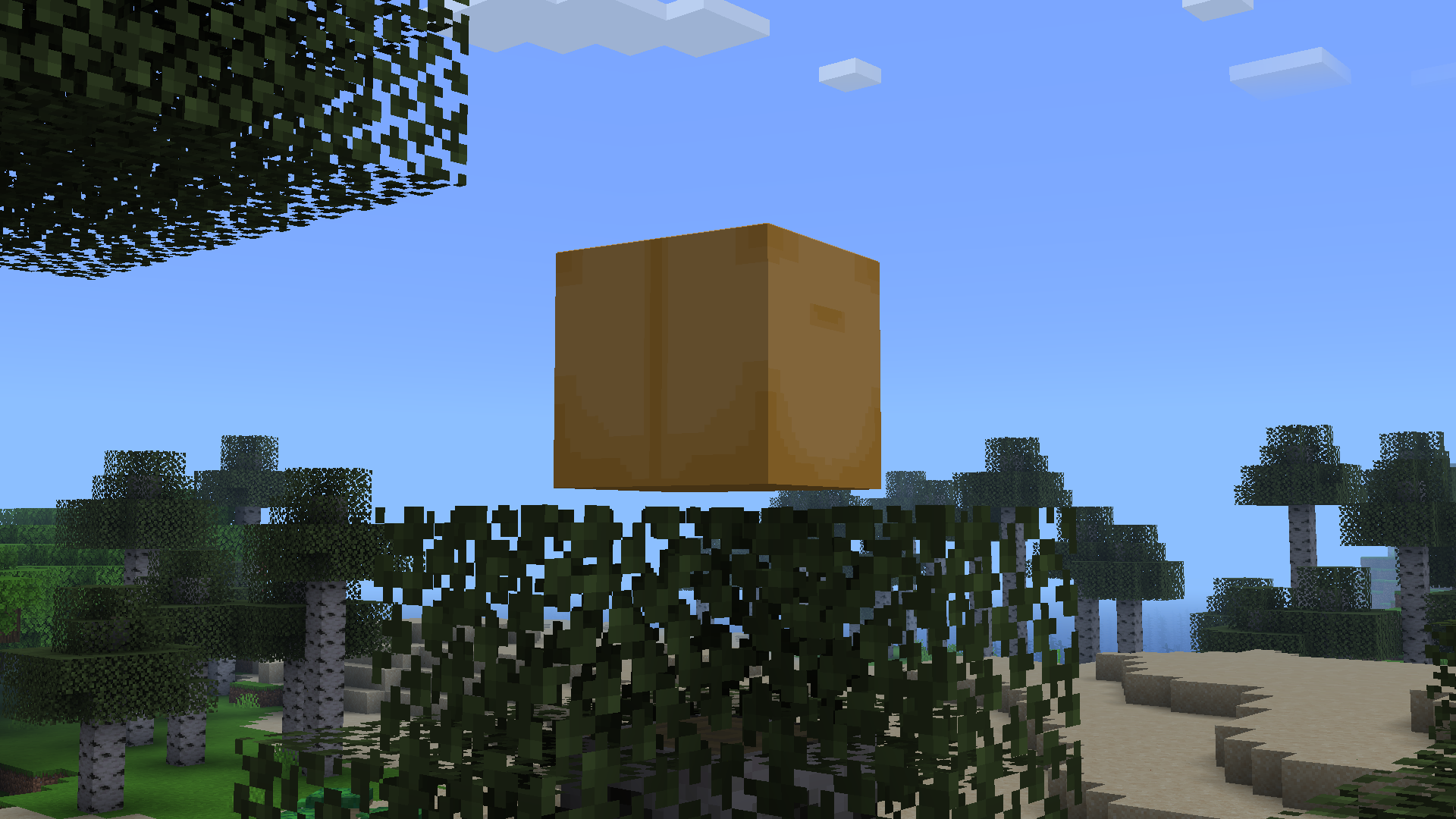
The Box es el contenedor de generación animado de Verity - un cubo amarillo-marrón flotante que aparece en el aire. Cuando Verity aparece, emerge de esta caja con una secuencia de animación. The Box es parte de la identidad visual de Verity y sirve como su “base” cuando no te sigue activamente.
Comportamiento de The Box:
- Aparece cuando Verity se genera por primera vez en tu mundo
- Verity emerge de la caja con una animación distinta
- La caja permanece en el aire como un marcador visual
- Puede ser destruida, pero Verity reaparecerá
Características visuales: The Box tiene un esquema de color amarillo-marrón distintivo que coincide con la paleta de Verity, facilitando su identificación en tu mundo. Es una parte clave de la narrativa visual del mod y ayuda a establecer la presencia de Verity.
Verity Demon - El Monstruo en el que Verity se Convierte

Verity Demon es el monstruo hostil en el que Verity se convierte. Cuando la cuenta regresiva de Verity llega a cero o se cumplen ciertas condiciones, el compañero de IA amigable se convierte en un perseguidor aterrador que acecha a los jugadores.
Capacidades del Demon:
- Rompe vidrio y puertas para alcanzarte
- Escala paredes y se abre paso por espacios estrechos
- Con la opción Can Crash activada, puede forzar una desconexión del juego
- Caza y acecha activamente a los jugadores
- Mucho más agresivo que la esfera amigable de Verity
Modelo del Demon: El modelo de Verity Demon fue creado por RoseRocket (YouTube: @RoseRocket) y presenta una cara aterradora con ojos negros vacíos y una sonrisa retorcida. Está diseñado para ser genuinamente aterrador y crea una tensión real durante el juego.
Ventana de súplica: Después de la transformación, hay una breve ventana donde puedes intentar calmar a Verity a través del chat. Si tienes éxito, Verity puede volver al modo amigable. Alternativamente, puedes matar al Demon para reiniciar el ciclo.
La Cuenta Regresiva de 5 Días y la Transformación
Verity opera en un sistema de cuenta regresiva que determina cuándo se transforma en el Demon. Por defecto, Verity te ayuda durante 5 días del juego antes de transformarse, pero esto es configurable en la configuración del mod.
Mecánicas de la cuenta regresiva:
- Predeterminado: 5 días (ajustable mediante la configuración Day Count)
- Verity te advierte: “something is coming in two days”
- La cuenta regresiva progresa independientemente de tus acciones
- Llegar a cero desencadena la transformación en Demon
Qué sucede durante la cuenta regresiva:
- Al principio, Verity es útil, da objetos gratis y comenta sobre el entorno
- A mitad de la cuenta regresiva, llega la advertencia de que “algo viene en dos días” y los animales empiezan a morir
- Al llegar a cero, se produce la transformación en Demon
Prevenir la transformación:
- Establecer la dificultad del juego en Pacífico (previene completamente la transformación)
- Ajustar Day Count en la configuración para extender el período de cuenta regresiva
Después de la transformación: Si Verity se transforma, tienes opciones:
- Intentar calmarlo a través del chat durante la ventana de súplica
- Matar al Demon para reiniciar y comenzar de nuevo
- Usar la dificultad Pacífico para prevenir futuras transformaciones
Sistema Karma - Cómo Verity Recuerda tu Comportamiento
Verity rastrea tu comportamiento a través de un sistema Karma que influye en cómo interactúa contigo. Las acciones amigables aumentan el Karma, mientras que las acciones hostiles lo disminuyen.
Construir Karma positivo:
- Chatea con Verity regularmente y usa lenguaje amigable
- Pide su opinión sobre construcciones y decisiones
- Explora juntos y señala características interesantes
- Acepta sus sugerencias y agradécele por la ayuda
Beneficios del Karma:
- Alto Karma desbloquea objetos gratis (madera, comida, antorchas)
- Verity se vuelve más proactivo y útil
- Respuestas más largas y detalladas
- Verity puede advertirte sobre peligros con más frecuencia
Perder Karma:
- Atacar a Verity o usar lenguaje hostil
- Ignorar sus advertencias o sugerencias
- Ser despectivo o grosero en el chat
Consecuencias de Karma bajo:
- Verity se vuelve frío y mínimo en las respuestas
- Puede dejar de dar objetos gratis
- Podría cortar tu suministro de recursos
- La transformación en Demon sigue llegando al final de la cuenta regresiva
Estas consecuencias se acumulan rápidamente. Para una guía práctica sobre mantener a Verity feliz, lee la guía de relaciones. La página de consejos y trucos cubre cómo recuperarte cuando el Karma baja.
Persistencia del Karma: Karma rastrea dentro de una sesión de juego e influye en el comportamiento de Verity. Mantener un Karma alto requiere interacción positiva consistente a lo largo de tu juego.
Cómo el Karma Da Forma a la Conversación
Karma no solo cambia lo que Verity te da - cambia cómo se siente la conversación. Con buen Karma, Verity es conversador y proactivo: comenta tu entorno, te avisa cuando algo anda mal y ofrece recursos sin que se los pidas. Con mal Karma, la calidez desaparece - respuestas cortas, menos regalos y eventualmente ninguna ayuda.
El cambio es gradual, no instantáneo. Un mensaje grosero no cambiará a Verity de útil a hostil, pero un patrón de ignorarlo, despreciarlo o atacarlo sí. Por eso el giro de Verity se siente personal - es una consecuencia que construiste con el tiempo, no un evento aleatorio. Para estrategias sobre mantener a Verity contento, lee la guía de relaciones.
Oscuridad Extrema y Cambios en el Juego
Verity cambia fundamentalmente cómo se juega Minecraft al introducir oscuridad extrema y escasez de recursos. El mod está diseñado para crear tensión y forzarte a depender de Verity para sobrevivir.
Oscuridad Verdadera:
- La noche se vuelve extremadamente oscura - casi completamente negra
- La linterna se convierte en equipo esencial (no se cae al morir)
- No puedes ver mobs hasta que estén muy cerca
- Crea miedo y tensión genuinos durante la noche
Verity mata animales:
- Las vacas recién generadas mueren inmediatamente
- Otros animales de granja y aldeanos tienen 50% de probabilidad de muerte
- A mitad de la cuenta regresiva, Verity elimina todos los mobs cercanos de una vez
- Te fuerza a depender de Verity para comida y recursos
Restricciones de sueño:
- Al principio de la cuenta regresiva, puedes dormir para saltar las noches
- Cuando el Demon está cerca, dormir se vuelve imposible
- Te fuerza a enfrentar la oscuridad y depender de Verity
Control de recursos:
- Verity controla el acceso a madera, comida y otros materiales
- Alto Karma = distribución generosa de recursos
- Bajo Karma = escasez de recursos y dificultad de supervivencia
Soporte de Idiomas de IA
La IA de Verity soporta conversación en todos los idiomas, haciéndolo accesible para jugadores en todo el mundo. La conversación basada en texto funciona con cualquier idioma que tu modelo Ollama soporte.
Conversación por texto:
- Soporta todos los idiomas para chat de texto
- Funciona con modos de IA local (Ollama) y nube (Groq/OpenRouter)
- Verity puede entender y responder en múltiples idiomas
- Respuestas con conciencia contextual independientemente del idioma
Funciones de voz:
- Voz a texto y texto a voz probados solo en inglés
- Puede funcionar con otros idiomas pero no está probado oficialmente
- Las funciones de voz requieren configuración adicional
Compatibilidad de modelos:
- Funciona con cualquier modelo Ollama que soporte tu idioma
- Modelos más grandes (8B-70B) proporcionan mejor soporte multilingüe
- Los modos nube (Groq/OpenRouter) pueden tener soporte de idiomas más amplio
Cómo Interactúan las Entidades
Las tres entidades (esfera Verity, The Box, Verity Demon) trabajan juntas para crear una experiencia de juego completa con fases distintas.
Secuencia de generación:
- The Box aparece en tu mundo
- Verity emerge de la caja con animación
- Verity comienza a seguirte y proporcionar ayuda
Fase amigable:
- La esfera Verity te sigue y proporciona ayuda
- Verity da objetos, comentarios y advertencias
- El sistema Karma rastrea tu comportamiento
Transformación:
- La cuenta regresiva llega a cero
- La esfera Verity se transforma en Verity Demon
- El juego cambia de asistencia a terror de supervivencia
Fase Demon:
- Verity Demon te caza y acecha
- Rompe barreras para alcanzarte
- Con la opción Can Crash activada, puede forzar una desconexión del juego
- Crea tensión y miedo genuinos
Ciclo de reinicio:
- Mata al Demon para reiniciar
- O ten éxito en la ventana de súplica para calmar a Verity
- El ciclo reinicia con nueva cuenta regresiva
Páginas Relacionadas
- ¿Qué es Verity Mod? — Comprende los básicos antes de profundizar en los detalles de las entidades
- Consejos y Trucos — Estrategias de supervivencia para lidiar con el comportamiento de Verity
- Historias de Jugadores — Experiencias de juego reales con Verity
- Modelos de IA Comparados — Elige entre backends Groq, OpenRouter y Ollama
¿Aún tienes preguntas?
Consulta estos recursos para más información sobre Verity Mod:
By Verity Mod Hub Team · Last updated: July 2026