
Verity Mod Demon Form Guide - All Forms & How to Survive
All Verity mod entities explained: Verity sphere, The Box, Verity Demon. Behaviors, mechanics, Karma system, and 5-day countdown.
Everything you need to know about Verity’s entities, behaviors, and mechanics in Verity JE for Minecraft Java. Learn more about what Verity is and check our tips guide for survival strategies.
Verity - The AI Companion Sphere

Verity is a glowing yellow sphere that follows you around in Minecraft. It’s your personal AI assistant that can talk, answer questions, and interact with your world. The sphere hovers about 2 blocks behind you, maintaining a comfortable distance while staying close enough for conversation.
Core capabilities:
- Responds to your chat messages with contextual AI-generated responses
- Comments on your surroundings, pointing out interesting features or dangers
- Reads your game data (coordinates, biome, inventory, health, light level, block you’re looking at)
- Generates proactive dialogue when you’re idle, keeping the interaction alive
- Supports all languages for text conversation (voice features tested in English only)
What Verity knows: The AI can read your position, what biome you’re in, what’s in your inventory, your health level, the light level around you, and which block you’re looking at. This contextual awareness allows Verity to make relevant comments and suggestions about your current situation.
AI modes: Verity supports two AI modes - local (Ollama) for maximum privacy, or cloud (Groq/OpenRouter) for faster responses. See Ollama Setup for configuration details.
The Box - Verity’s Animated Spawn Container
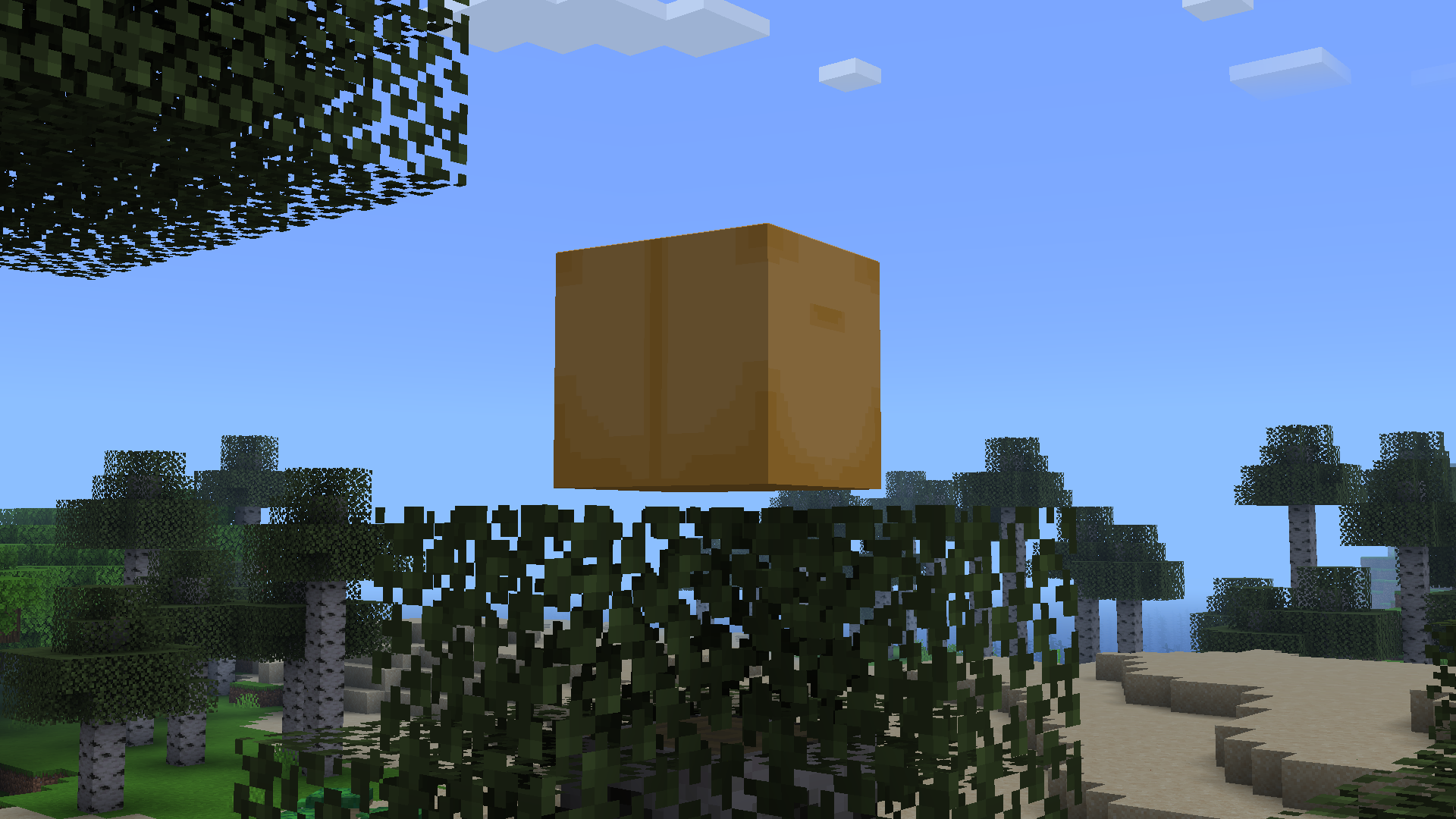
The Box is Verity’s animated spawn container — a floating yellow-brown cube that appears in the air. When Verity spawns, it emerges from this box with an animation sequence. That’s the Box’s role: it’s how Verity enters your world.
What’s confirmed about the Box:
- Appears when Verity spawns in your world
- Verity emerges from it with a distinct spawn animation
- Its yellow-brown color scheme matches Verity’s palette
The official project page describes it as the container Verity spawns from and doesn’t document interactions beyond that — so if you’ve seen claims about destroying the Box or using it to summon Verity back, treat those as unconfirmed.
Verity Demon - The Monster Verity Can Summon

Verity Demon is the hostile monster that Verity can summon or transform into. When Verity’s countdown reaches zero, the friendly AI companion transforms into a hostile entity that hunts players. The official page also describes the Demon as something Verity can “spawn or cause” — the countdown transformation is the main route.
Demon capabilities:
- Breaks glass and doors to reach you
- Climbs walls and squeezes through tight spaces
- With the Can Crash option enabled, it can force a game disconnect
- Actively hunts and stalks players
- Much more aggressive than the friendly Verity sphere
Demon model: The Verity Demon model was created by RoseRocket (YouTube: @RoseRocket) and features a terrifying face with empty black eyes and a twisted smile. It’s designed to be genuinely frightening and creates real tension during gameplay.
Plea window: After transformation, there’s a brief window where you can try to calm Verity down through chat. Killing the Demon also resets the cycle, so a fresh Verity starts over.
The 5-Day Countdown and Transformation
Verity operates on a countdown system that determines when it transforms into the Demon. By default, Verity helps you for 5 in-game days before transforming, but this is configurable in the mod settings.
Countdown mechanics:
- Default: 5 days (adjustable via Day Count config)
- Verity warns you: “something is coming in two days”
- Countdown progresses regardless of your actions
- Reaching zero triggers transformation to Demon
What the countdown looks like in practice:
- Early days: Verity is helpful — chatting, commenting on your surroundings, handing out free items if your Karma is good
- About two days out: Verity delivers the warning — “something is coming in two days”
- As it progresses: animals start dying (newly spawned cows immediately, other farm animals and villagers at 50%), and mid-countdown Verity wipes out all nearby mobs at once
- At zero: Verity transforms into the Demon
Preventing transformation:
- Set game difficulty to Peaceful (completely prevents transformation)
- Adjust Day Count in the mod’s settings to control how long the countdown runs
After transformation: If Verity transforms, you have options:
- Try to calm it down through chat during the plea window
- Kill the Demon to reset and start over
- Use Peaceful difficulty to prevent future transformations
Karma System - How Verity Remembers Your Behavior
Verity tracks your behavior through a Karma system that influences how it interacts with you. Friendly actions increase Karma, while hostile actions decrease it.
Building positive Karma:
- Chat with Verity regularly and use friendly language
- Ask for its opinion on builds and decisions
- Explore together and point out interesting features
- Accept its suggestions and thank it for help
Karma benefits:
- High Karma unlocks free items (wood, food, torches)
- Verity becomes more proactive and helpful
- Longer, more detailed responses
- Verity may warn you about dangers more frequently
Losing Karma:
- Attacking Verity or using hostile language
- Ignoring its warnings or suggestions
- Being dismissive or rude in chat
Low Karma consequences:
- Verity becomes cold and minimal in responses
- Stops giving free items
- Cuts off your resource supply
These consequences stack up fast. For a practical guide on keeping Verity happy, read the relationship guide. The tips and tricks page covers how to recover when Karma drops.
Karma persistence: Whether Karma carries over between game sessions isn’t documented — treat it as something you maintain through consistent interaction while you play.
How Karma Shapes the Conversation
Karma doesn’t just change what Verity gives you — it changes how the conversation feels. With good Karma, Verity is chatty and proactive: it volunteers observations about your surroundings, warns you when something’s off, and offers resources without being asked. With bad Karma, the warmth drains out — short replies, fewer gifts, and eventually no help at all.
The shift is gradual rather than instant. One rude message won’t flip Verity from helpful to hostile, but a pattern of ignoring, dismissing, or attacking it will. That’s what makes Verity’s turn feel personal — it’s a consequence you built up over days, not a random event. For strategies on keeping Verity happy, read the relationship guide.
Extreme Darkness and Gameplay Changes
Verity fundamentally changes how Minecraft plays by introducing extreme darkness and resource scarcity. The mod is designed to create tension and force you to rely on Verity for survival.
True Darkness:
- Night becomes extremely dark - nearly pitch black
- Flashlight becomes essential equipment (doesn’t drop on death)
- You can’t see mobs until they’re very close
- Creates genuine fear and tension during nighttime
Verity kills animals:
- Newly spawned cows die immediately
- Other farm animals and villagers have 50% death probability
- Mid-countdown, Verity clears all nearby mobs at once
- Forces you to rely on Verity for food and resources
Sleep restrictions:
- Early in the countdown, you can sleep to skip nights
- When Demon is near, sleeping becomes impossible
- Forces you to face the darkness and rely on Verity
Resource control:
- Verity controls access to wood, food, and other materials
- High Karma = generous resource distribution
- Low Karma = resource scarcity and survival difficulty
AI Language Support
Verity’s AI supports conversation in all languages, making it accessible to players worldwide. The text-based conversation works with any language that your Ollama model supports.
Text conversation:
- Supports all languages for text chat
- Works with local (Ollama) and cloud (Groq/OpenRouter) AI modes
- Verity can understand and respond in multiple languages
- Context-aware responses regardless of language
Voice features:
- Voice-to-text and text-to-speech tested in English only
- May work with other languages but not officially tested
- Voice features require additional configuration
Model compatibility:
- Works with any Ollama model that supports your language
- Larger models (8B-70B) provide better multilingual support
- Cloud modes (Groq/OpenRouter) may have broader language support
How the Entities Interact
The three entities (Verity sphere, The Box, Verity Demon) work together to create a complete gameplay experience with distinct phases.
Spawn sequence:
- The Box appears in your world
- Verity emerges from the box with its spawn animation
- Verity begins following you and providing assistance
Friendly phase:
- Verity sphere follows you and provides help
- The Box remains as a visual marker
- Verity gives items, comments, and warnings
- Karma system tracks your behavior
Transformation:
- Countdown reaches zero
- Verity sphere transforms into Verity Demon
- Gameplay shifts from assistance to survival horror
Demon phase:
- Verity Demon hunts and stalks you
- Breaks through barriers to reach you
- Can disconnect you from the game
- Creates genuine tension and fear
Reset cycle:
- Kill the Demon to reset
- Or succeed in plea window to calm Verity
- Cycle restarts with new countdown
Related Pages
- What is Verity Mod? — Understand the basics before diving into entity details
- Tips and Tricks — Survival strategies for dealing with Verity’s behavior
- Player Stories — Real gameplay experiences with Verity.
- AI Models Compared — Choose between Groq, OpenRouter, and Ollama backends
Still have questions?
Check out these resources for more information about Verity Mod:
By Verity Mod Hub Team · Last updated: July 2026